What this page helps you do
Use this article when a tenant needs the direct portal link, or when you want to preview the public portal before you share it. The current dashboard includes a dedicated Tenant Portal Link card for exactly this job.
Before you begin
- You need access to the landlord dashboard.
- The tenant should already know whether they are signing in to an existing account or creating one for the first time.
- If you want the link sent by email, have the tenant's email address ready.
Step 1: Open the Tenant Portal Link card on the dashboard
Path: Dashboard > Tenant Portal Link
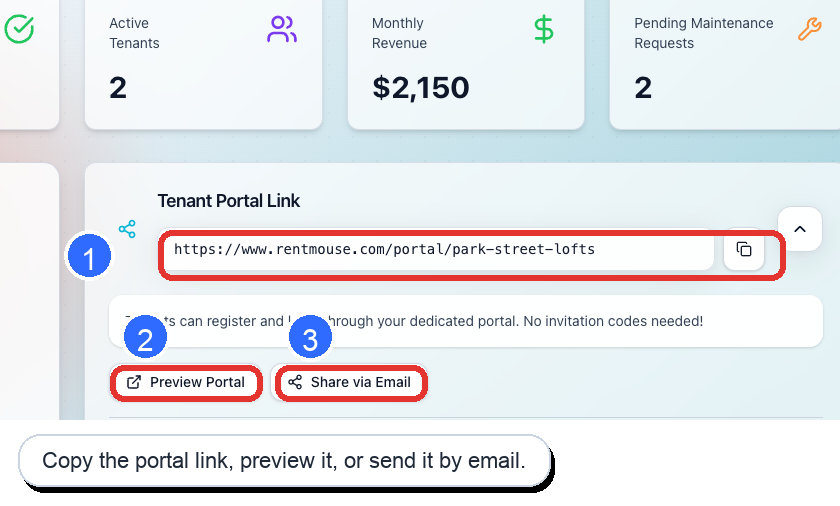
On the dashboard, locate the Tenant Portal Link card. If the card is collapsed, click the arrow on the right side to expand it.
In the current production interface, the expanded card shows your portal URL, a copy button, Preview Portal, and Share via Email.
Step 2: Choose how you want to share the portal
- Copy the link: Use the URL field and copy button if you want to paste the link into a text message, your own email, or a saved onboarding note.
- Preview Portal: Open the public portal page first so you can confirm what the tenant will see.
- Share via Email: Use this option if you want RentMouse to help you send the portal link by email from the dashboard workflow.
Step 3: Tell tenants what they will see next
When tenants open the portal URL, they arrive at the landlord-specific portal page and continue to the sign-in screen. New tenants should contact you first if they do not already have portal access.
What happens next
After the tenant signs in from the portal link, they can access their lease, make rent payments, submit maintenance requests, and communicate with you from the same place.
If something is not working
- If the tenant says the page does not load, send the link again by copying it directly from the dashboard instead of relying on an older saved link.
- If the tenant is new and cannot sign in, confirm that you have already given them portal access before sending them back to the sign-in page.
- If the tenant already has an account but forgot their password, send them to the sign-in page so they can use the password recovery option there.
Tips
- Ask tenants to bookmark the portal URL after their first successful sign-in.
- Preview the portal yourself before sharing it with a first-time tenant so you can explain what they will see.
- If you are also sending an invitation email, tell tenants they can use either the invitation link or the direct portal URL.