
You’re going to set up digital lease management so your lease isn’t just a PDF you can’t find later. You’ll build a repeatable workflow that connects the lease to rent collection, maintenance, and clean records, using RentMouse as the backbone.
A quick scene.
It’s 9:18 p.m. The kitchen light is too bright. Your laptop fan is doing that tiny jet-engine whine. A tenant texts: “Hey, are pets allowed again? You said yes on the phone.”
You remember the call. You do not remember what you wrote down (because you didn’t). And now you’re hunting through email threads that smell like panic.
That’s the real problem digital lease management solves.
The pain points that make leases blow up later
“I never got that” paperwork fog. Lease versions, addenda, pet rules, entry notices. They scatter.
Money terms that aren’t enforceable in practice. Grace periods, late fees, deposit amounts, payment methods. If they aren’t consistent, they’re fragile.
Operations that don’t match the lease. Maintenance requests arrive by text, receipts live in a shoebox, and you can’t prove timelines when it matters.
RentMouse is built for small landlords who want boring, provable workflows. Not more tabs.
Step 1: Choose your “source of truth” for digital lease management
What to do: Decide where the lease lives, where edits happen, and how you’ll name versions.
Why it matters: Most disputes aren’t about intent. They’re about proof. If your lease is created in one place, signed in another, and stored in a third, you end up with three truths (and none of them win arguments).
In RentMouse, treat the lease record as the hub. That’s your single place to build the agreement, attach addenda, and keep the executed copy organized.
Pro tip: Use a boring naming convention you’ll actually follow.
Example:
123-Main-St_Unit-2_Lease_2026-07-01_to_2027-06-30_v1.It’s not pretty. It works.
Step 2: Start the lease with the right property and unit details
What to do: In your lease workflow, select the property and the exact unit first, then let the system autofill what it can.
Why it matters: Wrong premises details are an avoidable, expensive mistake. Multi-unit buildings are where this bites hardest. One digit off, one unit wrong, and your “signed lease” is suddenly a messy conversation.
This is where digital lease management becomes a safety rail: start from the property record so addresses and unit identifiers stay consistent across the lease, notices, and tenant communications.
Warning: Don’t “just type it in” from memory.
Memory is not a filing system (sadly).
Step 3: Build the rules that usually cause the first fight (pets, smoking, guests)
What to do: Add the operational rules that tenants actually test:
Pet policy: allowed or not, limits, deposits, monthly pet rent, vaccination and insurance requirements
Smoking or vaping rules: prohibited or designated areas only
Guest and occupancy expectations: what’s allowed, when registration is required
Why it matters: Vague clauses create expensive gray areas. Clear rules reduce back-and-forth and give you something enforceable to point to when emotions are high.
If pet terms are a recurring headache, connect that workflow to tenant selection too. If you’re allowing pets, you’ll want consistent screening and documentation from day one. RentMouse helps you keep that intake clean via tenant screening tools so you’re not making “exceptions” you can’t defend later.
Callout: Tiny detail, big payoff
Put pet proof requirements in writing. Then store the documents in one place. When a neighbor complains six months later, you won’t be scrambling (or sweating).
Step 4: Lock in the money terms and make rent boring on purpose
What to do: Define the financial terms clearly:
Rent amount and due date
Accepted payment methods
Security deposit amount and handling
Late fee structure and any grace period
Why it matters: When rent is late, your brain goes loud. You want the system to stay calm.
This is where RentMouse connects lease terms to actual collection. Set up your rent workflow so payments, receipts, and status are tracked automatically through rent collection.
Late rent was eating into her savings in one of our earlier stories. The fix wasn’t “be stricter.” It was having clean, automatic proof.
Warning: Late fees and deposits are regulated differently across provinces, states, and cities.
Use your local rules before setting amounts or terms. Don’t copy a template from a different jurisdiction.
Step 5: Define maintenance responsibilities, then route requests into one channel
What to do: Write down who handles what, then set the expectation that maintenance requests go through a single system.
Examples that reduce drama:
Tenant handles: routine cleaning, light bulbs, batteries, minor clogs (unless caused by building issues)
Landlord handles: building systems, appliances (if provided), normal wear and tear
No unauthorized repairs without written permission
Why it matters: Maintenance is where timelines matter. A lot. If requests arrive via text at midnight, then email the next morning, then voicemail at lunch, you lose the thread.
RentMouse keeps requests, photos, updates, and vendor notes together through maintenance tracking. It’s the difference between “I think I responded” and “Here’s the timestamp.”
(Also, your phone deserves a break.)
Pro tip: Ask for photos and a short video in the request.
You can practically hear the difference between a drip and a gush.
Step 6: Set entry notice and communication habits that create proof
What to do: Decide how you’ll deliver notices and messages, then do it the same way every time.
Why it matters: Entry notice disputes often start with “I texted you.” Texts get lost. Screenshots are awkward. Your future self wants a tidy log.
Your lease should reference notice expectations, but your system should enforce the habit. RentMouse helps you keep lease-related records and messages attached to the tenancy via lease management so the timeline is easy to reconstruct.
Callout: Legal reality check
Many jurisdictions require “reasonable notice” for entry, and some specify hours and exceptions for emergencies.
Write the rule. Follow the rule. Keep the record.
Step 7: Execute, store, and archive like you’ll need it in a year (because you will)
What to do: Once the lease is finalized:
Generate the final version.
Collect signatures using a consistent signing method.
Save the executed lease and all addenda.
Store supporting documents: pet records, move-in condition photos, notices, receipts.
Why it matters: The win isn’t signing faster. The win is finding the right document in 12 seconds when a dispute lands.
RentMouse keeps your paperwork centralized with document storage, so you’re not digging through downloads named Lease-FINAL-FINAL2.pdf (we’ve all seen it, unfortunately).
Near the end of your process, do one last check: does your digital lease management workflow connect to the way you actually operate? If yes, you’re set.
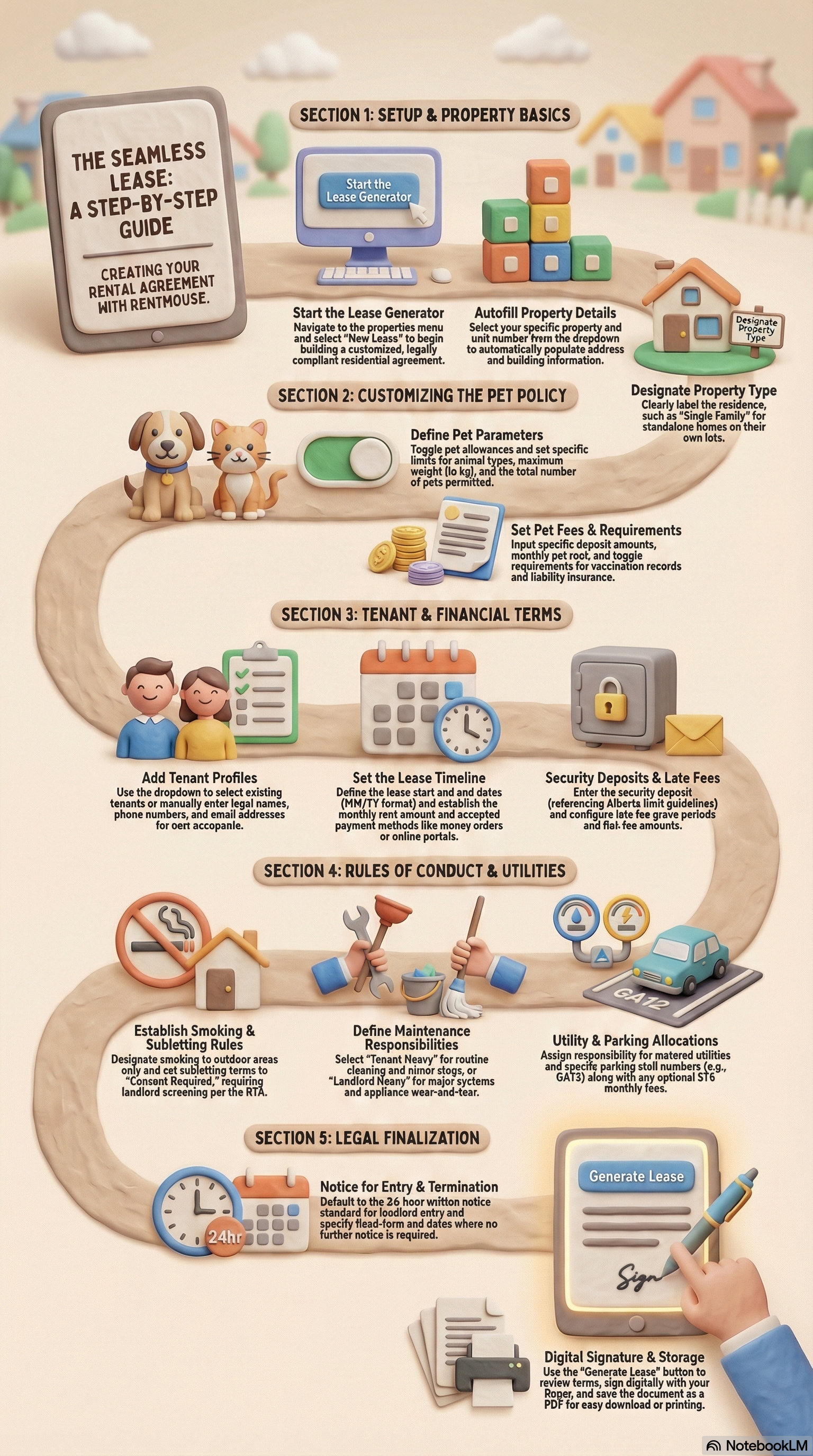
What you should expect after you set up digital lease management this way
Lease terms that match real life operations.
Fewer “he said, she said” moments because timelines and documents are easy to pull.
Rent collection and maintenance that feel quieter, because they’re attached to the tenancy record.
A repeatable process you can use for the next unit without reinventing it.
RentMouse works best when you treat it like your operating system, not a once-a-year filing cabinet. That’s when the stress drops.
CTA: Make your next lease boring (in the best way)
Start a RentMouse trial and set up your digital lease management workflow so rent, maintenance, and documents stay connected from day one.
Sources
Landlords operate under different rules by province, state, and city. Use these official references to confirm deposit limits, entry notice requirements, and standard lease expectations where you operate.
[1] Government of Alberta, Residential Tenancies Act (RSA 2000, c R-17) and related information pages, https://www.alberta.ca/residential-tenancies
[2] Government of Ontario, Residential Tenancies Act, 2006 (S.O. 2006, c. 17), https://www.ontario.ca/laws/statute/06r17
[3] British Columbia Government, Residential Tenancy Branch, https://www2.gov.bc.ca/gov/content/housing-tenancy/residential-tenancies
[4] U.S. Department of Housing and Urban Development (HUD), Tenant Rights and Responsibilities resources, https://www.hud.gov/topics/rental_assistance/tenantrights
Test Your Knowledge! 🎯
Question 1 of 5


